Showing posts with label Visual Foxpro SQL. Show all posts

Tuesday, 25 April 2017

Boolean Field in Visual Foxpro and MS SQL Server

In Visual Foxpro 9 (VFP) and it’s lower versions, there exists a logical field with which a programmer can use to have some kind of a digital flip-type switch that we regularly use in queries or in a control, like a checkbox, for example. If one can imagine how a light switch works, the idea behind is the same with that of a logical field. The apparent difference emerging from that point being, is that the usual ON and OFF status that we regularly see on a common household light switch is omitted, the logical field in VFP uses a boolean value of either .T. or .F. instead, with “.T.” representing the value for TRUE and “.F.” for FALSE.

So it’s kind of like when your dad asks you if you have left the garage lights on overnight, you may probably hear, “Is it TRUE that you have left the lights on last night?”

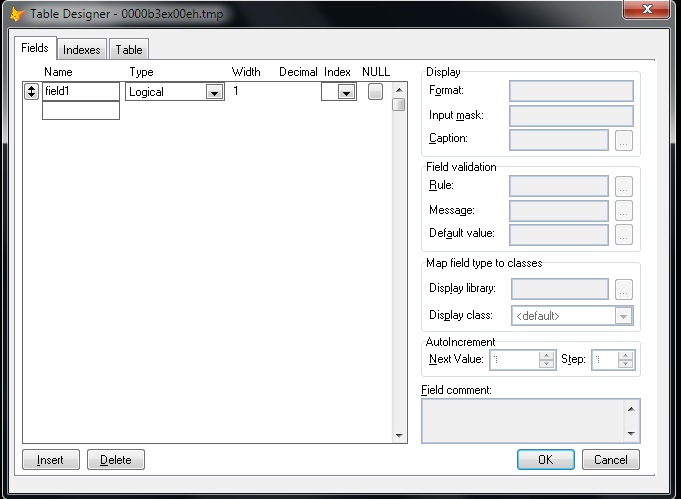
Anyway, Creating a logical field in a VFP cursor is as simple as this.

Create Cursor curTest (field1 l)

Select curTest
MODIFY STRUCTURE


But in MS SQL Server, with versions like 2008 or 2012, there is no Boolean or Logical field type. This is probably the reason why I see many software developers turning their trust to characters and integer types just to work around this inadequacy. 

For instance, a programmer can use several of the INT (integers) type field just to represent a value of 0 or 1. Because 0 and 1 can both respectively represent the ON and OFF nature of a basic switch. The idea makes sense until you add another value, like “2” then it loses the foremost characteristic of being a “flip-type” switch. 

The Workarounds in SQL Server


I’ve seen programmers use the int type, which has a range of -2^31 (-2,147,483,648) to  2^31-1 (2,147,483,647) and can take up storage of 4 Bytes in the table. Others use the smallint type, of which range is shorter than the int type but takes up 2 Bytes of storage space. There is also the tinyint that has a range of only 0 to 255 and takes up one Byte of storage space.

One thing to consider when you are feeling a bit determined to use these INT types for a simple switch is that each column of int created in a table will take up the storage space that I mentioned above. For example, if you have two columns of a tinyint field, each column will respectively take up one Byte of storage in a table.

At the other end of the spectrum, there are also those who use a character field to represent a switch in a similar fashion. These programmers, like I do in the early stages of my programming career, have liked the idea of using CHAR(1) type field to mimic the purpose of a logical field. The reason being is that it’s a straightforward solution and it’s easy to read. All that one needs to do is update the char field with a string having a value of “T” or an “F” character. 

The downside of using a char(1) field, however, is that it can take up other characters as well like “A” for instance, aside from the “T” or “F” characters. Also, each char(1) type column’s value in a table will take up 1 Byte of storage. Therefore, if you have two of this column in your table, the values will take up 2 Bytes and so on.

What I Think Is the Right Way to Do It


The best thing to do, in my humble opinion, is to use a bit type field in MS SQL Server. This type accepts integer data type like a bit value of 1 or 0, and it can have a NULL value as well.  

In this example, I’ve created a temporary table with a bit type field. I then inserted a 1 value.

If (Select name from sys.tables where name like '%#testTable%') is not null
      Begin
            drop table #testTable;

            create table #testTable (field1 bit);
     
            insert into #testTable (field1) values (1);
           
            select field1 from #testTable;     
      End

The advantage of the bit type is that it can automatically convert the string values TRUE and FALSE to bit values.  The “TRUE” becomes 1 and “FALSE” becomes 0.

If (Select name from sys.tables where name like '%#testTable%') is not null
      Begin
            drop table #testTable;

            create table #testTable (field1 bit);
     
            insert into #testTable (field1) values ('TRUE');
           
            select field1 from #testTable;     
      End

Sending Updates from Visual Foxpro


Luckily, MS SQL Server will convert the boolean value sent from Visual Foxpro by way of SQL-Pass Through or (SPT) connection.  

For this example, I have a table that I use for keeping LEAVE PAYS. It has a bit type column named isLeapYear. Let’s see what’s in it.


Notice that all other values in the isLeapYear column has zero values except for what’s in the fourth row, which has a bit value of 1.

Now, let’s try and change that into 0 (zero) by sending an UPDATE from Visual Foxpro with this command.

=SQLExec(oHandle.nHandle,'Update MyDatabase.dbo.MyTAble Set isLeapYear = .F.')


Now, we can see that all of the values in the isLeapYear column became zeros. 

Showing the Results with a Checkbox Control in a Grid


Let’s change the value of the fifth column, in the first row to 1. Then we’ll pull the records from MS SQL Server to a Visual Foxpro Grid that has a checkbox column.

=SQLExec(oHandle.nHandle,'Update MyDatabase.dbo.MyTAble Set isLeapYear = .F. where lpID = 9')


 So, this is how it should look like now. 


After we pulled the records from SQL Server, this is what a grid with a checkbox control would look like. Notice that the checkbox is automatically ticked because the underlying value in that column is .T. while the rest have .F. values. I will discuss how I created this checkbox in a grid  on a new post once I get a free time again.

Final Thoughts


Visual Foxpro is somehow lucky to have found its Logical values automatically converted by MS SQL Server to bit values. 

But another point worth considering for using a bit type field is that the SQL Server Database Engine optimizes storage of bit columns.  For example, if a table has less than 8 bit columns, all of the columns are stored as 1 byte. Having more than 8 bit columns but less than 16 will be stored as 2 bytes and so on.

As opposed to using an int type that always stores 1 byte or more per column, this is a great way to conserve server storage space if one is too concern about data normalization and storage conservation. 

Have a nice day!

Thursday, 24 November 2016

How To Convert Number To Words In Visual Foxpro 9.0

I created these funtions a long time ago, but I believe that there are still a number of software developers out there who are using VFP as their primary or secondary programming language.

To use this, save all these codes in a singe PRG file. To call the function anywhere in your VFP program, use this syntax (please do not use commas):

? NumToWord(12437.95)

****************************************
* Demo on converting number to words
* Primary usage: Philippine Local Checks
* Author: Glen T. Villar
* Date Created: January 13, 2009
* Code Updated: 12 April 2019
*****************************************

Function NumToWord(Par1 As Long)
 If Mod(Par1,1) > 0
  m.lcNewItem = FixItUp(Par1)+' Dollar and '+FixItUp(VAL(RIGHT(TRANSFORM(Par1,"9999999999999999999.99"),2)))+' Cents'
 Else
  m.lcNewItem = FixItUp(Par1)+' Dollar'
 Endif
 Return (m.lcNewItem)
Endfunc

Function FixItUp(Param1 As Long)
 ****************************************
 *  Author: Glen T. Villar
 *  Function for Converting Number to Words
 *  Primary usage: Philippine Local Checks
 *  Secondary usage: American Local Checks
 *  Date Created: January 13, 2009
 *  Date Modified: August 8, 2009
 *  Date Modified: April 12, 2019  
 *****************************************
 If !Empty(Param1)
  Dimension lArray[6]
  Local lcAnswer, nReiterate, lnLeftSide, lcWord, lcConcatenate, ;
   lnMove, lcTaken, lcWordsExt
  If !Empty(Param1)
   lcLeftPart = Alltrim(Transform(Int(Param1)))
   lnLeftSide = Len(m.lcLeftPart)
   nReiterate = 0
   For lnVar = 1 To Int(m.lnLeftSide/3)
    lnLeftSide = lnLeftSide - 3
    nReiterate = nReiterate + 1
   Endfor

   lcOnes = '1One,2Two,3Three,4Four,5Five,6Six,7Seven,8Eight,9Nine,'
   lcTees = '10Ten,11Eleven,12Twelve,13Thirteen,14Fourteen,15Fifteen,16Sixteen,17Seventeen,18Eighteen,19Nineteen,'
   lcTens = '2Twenty,3Thirty,4Forty,5Fifty,6Sixty,7Seventy,8Eighty,9Ninety,'
   lcTitle = '2Thousand,3Million,4Billion,5Thrillion,6Quadrillion,'

   lnMove = m.nReiterate * 3
   lcParam = Alltrim(Right(m.lcLeftPart,m.lnMove))
   lcClassify = ''
   lcClassify = Iif(Between(Mod(Val(Alltrim(Left(m.lcLeftPart,m.lnLeftSide)))/100,1) * 100,1,9), Strextract(m.lcOnes,Alltrim(Left(m.lcLeftPart,m.lnLeftSide)),','), ;
    IIF(Between(Mod(Val(Alltrim(Left(m.lcLeftPart,m.lnLeftSide)))/100,1) * 100,10,19), Strextract(m.lcTees,Alltrim(Left(m.lcLeftPart,m.lnLeftSide)),','), ;
    IIF(Between(Mod(Val(Alltrim(Left(m.lcLeftPart,m.lnLeftSide)))/100,1) * 100,20,99), Strextract(m.lcTens,Alltrim(Left(m.lcLeftPart,1)),',')+Space(1)+ ;
    Strextract(m.lcOnes,Alltrim(Substr(m.lcLeftPart,2,1)),','),'')))

   For lnVar = 1 To m.nReiterate
    lnMove = m.lnMove-3
    lcTaken = Substr(lcParam,m.lnMove+1,3)

    If Mod((Val(m.lcTaken)/100),1) * 100 > 19
     lcConcatenate = Strextract(m.lcOnes,Alltrim(Left(m.lcTaken,1)),',')+Iif(Alltrim(Left(m.lcTaken,1))<>'0',' Hundred ','')+ ;
      Strextract(m.lcTens,Alltrim(Substr(m.lcTaken,2,1)),',')+Space(1)+Strextract(m.lcOnes,Alltrim(Right(m.lcTaken,1)),',')
    Else
     lcConcatenate = Strextract(m.lcOnes,Alltrim(Left(m.lcTaken,1)),',')+ Iif(Alltrim(Left(m.lcTaken,1))<>'0',' Hundred ','')+;
      Strextract(m.lcTees,Alltrim(Substr(m.lcTaken,2,2)),',')+Iif(Mod(Val(m.lcTaken)/100,1) * 100 < 11,Strextract(m.lcOnes,Alltrim(Right(m.lcTaken,1)),','),;
      Strextract(m.lcTens,Alltrim(Substr(m.lcTaken,2,2)),','))
    Endif
    lArray[lnVar] = m.lcConcatenate + Space(1) + Strextract(m.lcTitle,Alltrim(Str(m.lnVar)),',')
   Endfor

   lcWordsExt = ''
   For nVal = m.nReiterate To 1 Step -1
    lcWordsExt = lcWordsExt + Space(1) + ;
     Iif(Getwordcount(lArray[nVal])=1 And Inlist(Upper(Alltrim(lArray[nVal])),'THOUSAND','MILLION'),'',lArray[nVal])
   Endfor

   lcNewWord = ''
   lcNewWord = m.lcClassify + Space(1)+;
    IIF(!Empty(m.lcClassify),Alltrim(Right(Getwordnum(m.lcTitle,m.nReiterate,','),Len(Getwordnum(m.lcTitle,m.nReiterate,','))-1)),'');
    +Space(1)+;
    Alltrim(m.lcWordsExt)

   Return Alltrim(m.lcNewWord)
  Endif
 Else
  Return ''
 Endif
Endfunc

Friday, 8 April 2016

How To Select All Nodes In Treeview In VFP 9.0


A more appropriate title of this article should have been  "How To Check All Child Nodes From a Parent Node In Treeview" but since I used a treeview control that contained only one parent node with multiple child nodes within, I guess I'd stick with the current title.

Here's one way I achieve the effect. But before I show the code behind, take note of the underlying table records where the treeview gets its record from.


The parent node has a "02_" string as a key as shown from the highlighted row in the image above. All the child nodes have different keys but have the same parent, a "02_" text that is used as a pointer to their parent node.

In the Treeview's .NodeCheck event, I wrote the following codes.

*** ActiveX Control Event ***
Lparameters Node
If Node.Key <> '02_'
      Return
Endif

For Each oNode In Thisform.oletreeView.Nodes
      oNode.Checked = Iif(Node.Checked,.F.,.T.)
Endfor

You can see that I added a checking routine to know if the user is ticking on the parent node or the child node. If the user has checked any of the child node, it will stop from there and will not proceed to executing the next codes, hence the "Return" keyword.

Next, I reiterate through all the treeview's nodes and set each node's checked property to either TRUE or FALSE depending on the parent's current "checked " status. If the parent's checkbox is unticked, the current child node in focus during which is set to checked; otherwise, it is unchecked.

Here's the result of which.


Sunday, 3 May 2015

Date Imported From Excel Changed Into Number


When importing data from an Excel file into VFP cursor, a date field may change into number field like the example below:


 Date in Excel
Current Number In Cursor
19-Dec-2006
39070
30-dec-2008
39812
19-May-1989
32647

To fix the issue, we could either replace all the serial numbers in the new field with this command:

Scan
   Replace SomeField with SomeField + {^1899/12/30}
EndScan

Or use a select statement that should convert that serial number back to date readable by human eyes.
Select SomeField + {^1899/12/30} As NewField from SomeTable Into Cursor TestCursor

Saturday, 2 May 2015

Extracting Date In 10-Digit Integer Format from MySQL To VFP

To extract date from a MySQL field in 10-digit integer format, we can use  FROM_UNIXTIME function.

Assuming you are connected via ODBC (SPT):

=SQLExec(m.nConnect,'select from_unixtime(somefield) as xdatetime from sometable','SomeViews') && should produce datetime


=SQLExec(m.nConnect,'select Date(from_unixtime(somefield)) as xdate from sometable','SomeViews') &&should produce date format

Thursday, 30 April 2015

Reindexing in VFP and MS SQL Server

In Visual Foxpro, there is no need to reindex an existing index once you create an index right after you open a table.

USE Temptable

INDEX on somefield TO someindex

In SQL Server, reindexing means building the index again. Rebuilding the index for a certain table in SQL Server is not cumbersome and how often you should do that would depend on your choice, if you wanted it done regularly or not at all.

You can either right click on an index (a node in indexes under a table) in SQL Server Management Studio and select REBUILD or run a query like my example below...

ALTER INDEX [pkid_index] ON [dbo].[Customers] REBUILD PARTITION = ALL WITH
   ( PAD_INDEX  = OFF, STATISTICS_NORECOMPUTE  = OFF, ALLOW_ROW_LOCKS  = ON,
   ALLOW_PAGE_LOCKS  = ON, IGNORE_DUP_KEY  = OFF, ONLINE = ON, SORT_IN_TEMPDB = OFF )


...or if you worry about your availability to execute a manual reindexing, you can assign the SQL Server Agent to do the thing automatically for you at a certain date and time. Mine for example is done every week at 00:00H when nobody is using my programs. You can create it in the Maintenance Plan.

Tuesday, 31 March 2015

Generating Unique ID's From An Auto-Increment Field

Here's an example of how we can create a reference to a 10-digit running number that we can use as a unique ID to anything we want.

We'll just need a table that contains nothing and will serve as a reference only to the last auto-generated number from its auto-increment field.

Here's the structure of the table in MSSQL to hold the 10-digit ID.

CREATE TABLE [dbo].[sometable](
 [lastuid] [int] IDENTITY(1000000000,1) NOT NULL,
 [dtstamp] [datetime] NULL
) ON [PRIMARY]


And here's the stored procedure to get the last ID from that table.

Create Procedure dbo.GetUID 
As 
Begin
 insert into sometable (dtstamp) values (getdate())
 select @@identity as lastUID
 delete from sometable
End

The procedure can be altered so that it retains a single row that contains the timestamp just in case we want to know when the last ID was generated. Just move the DELETE command to the line before the INSERT command. Either procedure will return the last generated ID.


Create Procedure dbo.GetUID 
As 
Begin
 delete from sometable
 insert into sometable (dtstamp) values (getdate())
 select @@identity as lastUID
End

And finally, we can extract a new unique ID in VFP by executing a call in an SPT connection.

=SQLExec(m.nConnection,'execute dbo.getuid','curTableID')


And from SSMS itself:

execute dbo.getuid will bring out:


Monday, 9 June 2014

Exporting Visual Foxpro Tables to MS SQL Server

VISUAL FOXPRO 9.0 - I find out that the easiest way (for me) to upload VFP free tables into a SQL Server 2005 database is through the Upsizing Wizard provided by Microsoft Access 2010.

When Microsoft still supports VFPODBC, we can do that by setting up a data source pointing to VFP  tables and import them to a  MS Access Database.

But according to MS, they no longer support the VFPODBC and they recommend the use of Visual Foxpro OLE DB driver instead.

Too bad;  but anyway, we can still do something about this. I'll demonstrate a similar technique that does the same. Without VFPODBC, we will rely on Access' built-in dBASE importing option. The downside though is that it will only let us import one VFP table to MS Access Database at a time. If you're in for some boring software stuff, please read on. :)

Sunday, 8 June 2014

Create New Table From SELECT SQL

The Reporter's Assistant
Photo Credits: images.businessweek.com
In Visual Foxpro 9.0, it's a norm to do a SELECT statement that writes all the queried records to a new table. This saves you time from making a new table along with all the fields within and fill it with records later from a SELECT query.

A simple SELECT statement like the example below creates a new table in VFP from a query:

Saturday, 7 June 2014

SQL Server Identity Column vs VFP AutoInc Field

In  order to have an efficient table structure which minimizes data redundancy, developers have employed normalization in which tables are broken down into several tables connected together by a certain field which is either a primary key or a foreign key for the purpose of RDMS.

This is being done not only to avoid data redundancy but also to keep the size of the table small as possible especially if you are working with VFP free tables which have a maximum of 2GB filesize per table.

I have come to learn the use of the primary key (PK) and foreign key (FK) from www.foxite.com when I was younger and in VFP, we heavily make use of a special field called AUTOINC (auto-increment) field.

The AUTOINC field, as the word implies by itself, is just a field which automatically increments itself after a successful INSERT INTO command. The addition of this in VFP 9 has since freed the developers from the agony of maintaining a cumulative number which is used as a PK or for in any invoicing purposes.

Monday, 2 June 2014

String Manipulation In SQL Server And Visual Foxpro SQL


One of my friend asked me about writing a query in SQL Server which can alter a portion of word or characters in a field in a table.

Since he is a VFP guy, I showed him how I could do this both in VFP and in SQL Server so he could understand it easily.

In Visual Foxpro, we can either write xbase-type codes or make use of VFP-SQL and use UPDATE in a query to change a portion of words in a field.

An example in VFP would be:

Related Posts Plugin for WordPress, Blogger...