Showing posts with label Visual Foxpro and MySQL. Show all posts

Tuesday, 25 April 2017

Boolean Field in Visual Foxpro and MS SQL Server

In Visual Foxpro 9 (VFP) and it’s lower versions, there exists a logical field with which a programmer can use to have some kind of a digital flip-type switch that we regularly use in queries or in a control, like a checkbox, for example. If one can imagine how a light switch works, the idea behind is the same with that of a logical field. The apparent difference emerging from that point being, is that the usual ON and OFF status that we regularly see on a common household light switch is omitted, the logical field in VFP uses a boolean value of either .T. or .F. instead, with “.T.” representing the value for TRUE and “.F.” for FALSE.

So it’s kind of like when your dad asks you if you have left the garage lights on overnight, you may probably hear, “Is it TRUE that you have left the lights on last night?”

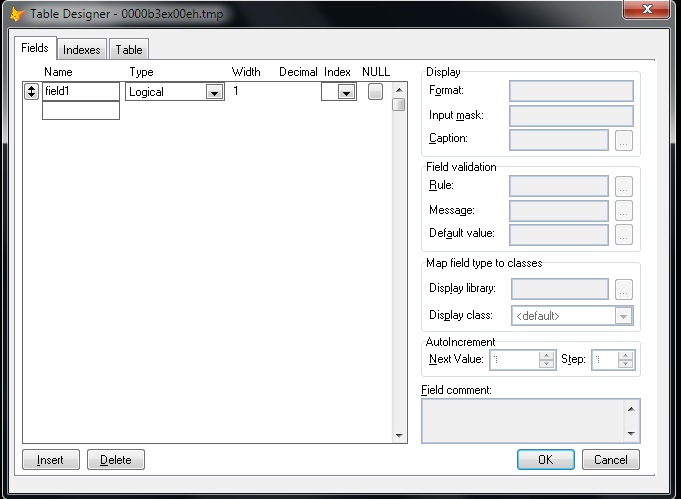
Anyway, Creating a logical field in a VFP cursor is as simple as this.

Create Cursor curTest (field1 l)

Select curTest
MODIFY STRUCTURE


But in MS SQL Server, with versions like 2008 or 2012, there is no Boolean or Logical field type. This is probably the reason why I see many software developers turning their trust to characters and integer types just to work around this inadequacy. 

For instance, a programmer can use several of the INT (integers) type field just to represent a value of 0 or 1. Because 0 and 1 can both respectively represent the ON and OFF nature of a basic switch. The idea makes sense until you add another value, like “2” then it loses the foremost characteristic of being a “flip-type” switch. 

The Workarounds in SQL Server


I’ve seen programmers use the int type, which has a range of -2^31 (-2,147,483,648) to  2^31-1 (2,147,483,647) and can take up storage of 4 Bytes in the table. Others use the smallint type, of which range is shorter than the int type but takes up 2 Bytes of storage space. There is also the tinyint that has a range of only 0 to 255 and takes up one Byte of storage space.

One thing to consider when you are feeling a bit determined to use these INT types for a simple switch is that each column of int created in a table will take up the storage space that I mentioned above. For example, if you have two columns of a tinyint field, each column will respectively take up one Byte of storage in a table.

At the other end of the spectrum, there are also those who use a character field to represent a switch in a similar fashion. These programmers, like I do in the early stages of my programming career, have liked the idea of using CHAR(1) type field to mimic the purpose of a logical field. The reason being is that it’s a straightforward solution and it’s easy to read. All that one needs to do is update the char field with a string having a value of “T” or an “F” character. 

The downside of using a char(1) field, however, is that it can take up other characters as well like “A” for instance, aside from the “T” or “F” characters. Also, each char(1) type column’s value in a table will take up 1 Byte of storage. Therefore, if you have two of this column in your table, the values will take up 2 Bytes and so on.

What I Think Is the Right Way to Do It


The best thing to do, in my humble opinion, is to use a bit type field in MS SQL Server. This type accepts integer data type like a bit value of 1 or 0, and it can have a NULL value as well.  

In this example, I’ve created a temporary table with a bit type field. I then inserted a 1 value.

If (Select name from sys.tables where name like '%#testTable%'is not null
      Begin
            drop table #testTable;

            create table #testTable (field1 bit);
     
            insert into #testTable (field1values (1);
           
            select field1 from #testTable;     
      End

The advantage of the bit type is that it can automatically convert the string values TRUE and FALSE to bit values.  The “TRUE” becomes 1 and “FALSE” becomes 0.

If (Select name from sys.tables where name like '%#testTable%') is not null
      Begin
            drop table #testTable;

            create table #testTable (field1 bit);
     
            insert into #testTable (field1) values ('TRUE');
           
            select field1 from #testTable;     
      End

Sending Updates from Visual Foxpro


Luckily, MS SQL Server will convert the boolean value sent from Visual Foxpro by way of SQL-Pass Through or (SPT) connection.  

For this example, I have a table that I use for keeping LEAVE PAYS. It has a bit type column named isLeapYear. Let’s see what’s in it.


Notice that all other values in the isLeapYear column has zero values except for what’s in the fourth row, which has a bit value of 1.

Now, let’s try and change that into 0 (zero) by sending an UPDATE from Visual Foxpro with this command.

=SQLExec(oHandle.nHandle,'Update MyDatabase.dbo.MyTAble Set isLeapYear = .F.')


Now, we can see that all of the values in the isLeapYear column became zeros. 

Showing the Results with a Checkbox Control in a Grid


Let’s change the value of the fifth column, in the first row to 1. Then we’ll pull the records from MS SQL Server to a Visual Foxpro Grid that has a checkbox column.

=SQLExec(oHandle.nHandle,'Update MyDatabase.dbo.MyTAble Set isLeapYear = .F. where lpID = 9')


 So, this is how it should look like now. 


After we pulled the records from SQL Server, this is what a grid with a checkbox control would look like. Notice that the checkbox is automatically ticked because the underlying value in that column is .T. while the rest have .F. values. I will discuss how I created this checkbox in a grid  on a new post once I get a free time again.

Final Thoughts


Visual Foxpro is somehow lucky to have found its Logical values automatically converted by MS SQL Server to bit values. 

But another point worth considering for using a bit type field is that the SQL Server Database Engine optimizes storage of bit columns.  For example, if a table has less than 8 bit columns, all of the columns are stored as 1 byte. Having more than 8 bit columns but less than 16 will be stored as 2 bytes and so on.

As opposed to using an int type that always stores 1 byte or more per column, this is a great way to conserve server storage space if one is too concern about data normalization and storage conservation. 

Have a nice day!

Thursday, 24 November 2016

How To Convert Number To Words In Visual Foxpro 9.0

I created these funtions a long time ago, but I believe that there are still a number of software developers out there who are using VFP as their primary or secondary programming language.

To use this, save all these codes in a singe PRG file. To call the function anywhere in your VFP program, use this syntax (please do not use commas):

? NumToWord(12437.95)

****************************************
* Demo on converting number to words
* Primary usage: Philippine Local Checks
* Author: Glen T. Villar
* Date Created: January 13, 2009
* Code Updated: 12 April 2019
*****************************************

Function NumToWord(Par1 As Long)
 If Mod(Par1,1) > 0
  m.lcNewItem = FixItUp(Par1)+' Dollar and '+FixItUp(VAL(RIGHT(TRANSFORM(Par1,"9999999999999999999.99"),2)))+' Cents'
 Else
  m.lcNewItem = FixItUp(Par1)+' Dollar'
 Endif
 Return (m.lcNewItem)
Endfunc

Function FixItUp(Param1 As Long)
 ****************************************
 *  Author: Glen T. Villar
 *  Function for Converting Number to Words
 *  Primary usage: Philippine Local Checks
 *  Secondary usage: American Local Checks
 *  Date Created: January 13, 2009
 *  Date Modified: August 8, 2009
 *  Date Modified: April 12, 2019  
 *****************************************
 If !Empty(Param1)
  Dimension lArray[6]
  Local lcAnswer, nReiterate, lnLeftSide, lcWord, lcConcatenate, ;
   lnMove, lcTaken, lcWordsExt
  If !Empty(Param1)
   lcLeftPart = Alltrim(Transform(Int(Param1)))
   lnLeftSide = Len(m.lcLeftPart)
   nReiterate = 0
   For lnVar = 1 To Int(m.lnLeftSide/3)
    lnLeftSide = lnLeftSide - 3
    nReiterate = nReiterate + 1
   Endfor

   lcOnes = '1One,2Two,3Three,4Four,5Five,6Six,7Seven,8Eight,9Nine,'
   lcTees = '10Ten,11Eleven,12Twelve,13Thirteen,14Fourteen,15Fifteen,16Sixteen,17Seventeen,18Eighteen,19Nineteen,'
   lcTens = '2Twenty,3Thirty,4Forty,5Fifty,6Sixty,7Seventy,8Eighty,9Ninety,'
   lcTitle = '2Thousand,3Million,4Billion,5Thrillion,6Quadrillion,'

   lnMove = m.nReiterate * 3
   lcParam = Alltrim(Right(m.lcLeftPart,m.lnMove))
   lcClassify = ''
   lcClassify = Iif(Between(Mod(Val(Alltrim(Left(m.lcLeftPart,m.lnLeftSide)))/100,1) * 100,1,9), Strextract(m.lcOnes,Alltrim(Left(m.lcLeftPart,m.lnLeftSide)),','), ;
    IIF(Between(Mod(Val(Alltrim(Left(m.lcLeftPart,m.lnLeftSide)))/100,1) * 100,10,19), Strextract(m.lcTees,Alltrim(Left(m.lcLeftPart,m.lnLeftSide)),','), ;
    IIF(Between(Mod(Val(Alltrim(Left(m.lcLeftPart,m.lnLeftSide)))/100,1) * 100,20,99), Strextract(m.lcTens,Alltrim(Left(m.lcLeftPart,1)),',')+Space(1)+ ;
    Strextract(m.lcOnes,Alltrim(Substr(m.lcLeftPart,2,1)),','),'')))

   For lnVar = 1 To m.nReiterate
    lnMove = m.lnMove-3
    lcTaken = Substr(lcParam,m.lnMove+1,3)

    If Mod((Val(m.lcTaken)/100),1) * 100 > 19
     lcConcatenate = Strextract(m.lcOnes,Alltrim(Left(m.lcTaken,1)),',')+Iif(Alltrim(Left(m.lcTaken,1))<>'0',' Hundred ','')+ ;
      Strextract(m.lcTens,Alltrim(Substr(m.lcTaken,2,1)),',')+Space(1)+Strextract(m.lcOnes,Alltrim(Right(m.lcTaken,1)),',')
    Else
     lcConcatenate = Strextract(m.lcOnes,Alltrim(Left(m.lcTaken,1)),',')+ Iif(Alltrim(Left(m.lcTaken,1))<>'0',' Hundred ','')+;
      Strextract(m.lcTees,Alltrim(Substr(m.lcTaken,2,2)),',')+Iif(Mod(Val(m.lcTaken)/100,1) * 100 < 11,Strextract(m.lcOnes,Alltrim(Right(m.lcTaken,1)),','),;
      Strextract(m.lcTens,Alltrim(Substr(m.lcTaken,2,2)),','))
    Endif
    lArray[lnVar] = m.lcConcatenate + Space(1) + Strextract(m.lcTitle,Alltrim(Str(m.lnVar)),',')
   Endfor

   lcWordsExt = ''
   For nVal = m.nReiterate To 1 Step -1
    lcWordsExt = lcWordsExt + Space(1) + ;
     Iif(Getwordcount(lArray[nVal])=1 And Inlist(Upper(Alltrim(lArray[nVal])),'THOUSAND','MILLION'),'',lArray[nVal])
   Endfor

   lcNewWord = ''
   lcNewWord = m.lcClassify + Space(1)+;
    IIF(!Empty(m.lcClassify),Alltrim(Right(Getwordnum(m.lcTitle,m.nReiterate,','),Len(Getwordnum(m.lcTitle,m.nReiterate,','))-1)),'');
    +Space(1)+;
    Alltrim(m.lcWordsExt)

   Return Alltrim(m.lcNewWord)
  Endif
 Else
  Return ''
 Endif
Endfunc

Saturday, 4 June 2016

UNDEFINED FUNCTION MB_DETECT_ENCODING()

If you're seeing this problem in your browser after trying to do a new set up of phpMyAdmin to Windows 7 IIS...

PHP Fatal error:  Uncaught Error: Call to undefined function mb_detect_encoding() in C:\inetpub\wwwroot\phpmyadmin46\libraries\php-gettext\gettext.inc:177

Stack trace:
#0 C:\inetpub\wwwroot\phpmyadmin46\libraries\php-gettext\gettext.inc(282): _encode('The %s extensio...')
#1 C:\inetpub\wwwroot\phpmyadmin46\libraries\php-gettext\gettext.inc(289): _gettext('The %s extensio...')
#2 C:\inetpub\wwwroot\phpmyadmin46\libraries\core.lib.php(306): __('The %s extensio...')
#3 C:\inetpub\wwwroot\phpmyadmin46\libraries\core.lib.php(957): PMA_warnMissingExtension('mbstring', true)
#4 C:\inetpub\wwwroot\phpmyadmin46\libraries\common.inc.php(102): PMA_checkExtensions()
#5 C:\inetpub\wwwroot\phpmyadmin46\setup\lib\common.inc.php(22): require_once('C:\\inetpub\\wwwr...')
#6 C:\inetpub\wwwroot\phpmyadmin46\setup\index.php(13): require('C:\\inetpub\\wwwr...')
#7 {main}
  thrown in C:\inetpub\wwwroot\phpmyadmin46\libraries\php-gettext\gettext.inc on line 177

... this solution can help you.


1. Open php.ini in your PHP folder.

2. Find the extension below and uncomment (remove the ;)
    
   ;extension=php_mbstring.dll ---->  change this to extension=php_mbstring.dll
3. If you want, although not necessary, you can default the mbstring language setting to English. Just find the mbstring.language = and change it to mbstring.language = English.


Friday, 8 April 2016

How To Select All Nodes In Treeview In VFP 9.0


A more appropriate title of this article should have been  "How To Check All Child Nodes From a Parent Node In Treeview" but since I used a treeview control that contained only one parent node with multiple child nodes within, I guess I'd stick with the current title.

Here's one way I achieve the effect. But before I show the code behind, take note of the underlying table records where the treeview gets its record from.


The parent node has a "02_" string as a key as shown from the highlighted row in the image above. All the child nodes have different keys but have the same parent, a "02_" text that is used as a pointer to their parent node.

In the Treeview's .NodeCheck event, I wrote the following codes.

*** ActiveX Control Event ***
Lparameters Node
If Node.Key <> '02_'
      Return
Endif

For Each oNode In Thisform.oletreeView.Nodes
      oNode.Checked = Iif(Node.Checked,.F.,.T.)
Endfor

You can see that I added a checking routine to know if the user is ticking on the parent node or the child node. If the user has checked any of the child node, it will stop from there and will not proceed to executing the next codes, hence the "Return" keyword.

Next, I reiterate through all the treeview's nodes and set each node's checked property to either TRUE or FALSE depending on the parent's current "checked " status. If the parent's checkbox is unticked, the current child node in focus during which is set to checked; otherwise, it is unchecked.

Here's the result of which.


Sunday, 10 May 2015

Host Is Not Allowed To Connect To This MySQL Server Error In Visual Foxpro


When you encounter this type of error in VFP, it may mean that the MySQL account you are using does not have the right privileges.

For a quick fix, go to the server PC and open MySQL Command Line Client. Type the command below:


grant all privileges on *.* to root@'%' identified by 'YourPassword';


Change the 'root' if you're not using that user and change YourPassword with your own password.


Thursday, 7 May 2015

Show MySQL Port

What is the open port that your MySQL is using? By default it should be 3306, but in any case that you might have changed it during the installation then perhaps you could include the port number in your connection string.

You can check it via the MySQL command line client by typing:

SHOW variables LIKE 'port';

Monday, 4 May 2015

Connecting VFP To MySQL Database

Here's how to access a MySQL database from VFP.

First, you need to download an ODBC connector to MySQL from this link. Choose between 32 or 64 bit version.
http://dev.mysql.com/downloads/mirror.php?id=412782

Next is to connect to it via DSN or DSNless connection.
Here's an example of a connection string via a DSNLESS (ODBC) connection. Please note that the lines starting with an asterisk (*) are comments.


lcStringConnect = 'Driver=MySQL ODBC 5.2 Unicode Driver;Server=localhost;uid=root;pwd=password'

*---This part here sets connection errors hidden.

SQLSetprop(0, "DispLogin", 3)
SQLSetprop(0, "DispWarnings", .F.)

*---This is where the actual connection happens.

lnConnect = Sqlstringconnect(m.lcStringConnect)

*---The variable lnConnect holds the number returned by the function
*---SQLSTRINGCONNECT(), if the value is greater than zero (0) then
*---no error happened during the connection attempt. 

If m.lnConnect > 0
  *--- List the databases in MYSQL.
   SQLEXEC(m.lnconnect,'show databases','testcur')
   BROWSE
Endif

=SQLDisconnect(m.lnConnect) && Close Connection


If the MySQL Database is remote (or online), you will need to specify the IP address as a server name in the connection string.
Related Posts Plugin for WordPress, Blogger...