Showing posts with label SQL Server. Show all posts

Monday, 19 June 2017

Choosing Between Char, Varchar and NVarChar Data Types

What is the best way to store a string data type into an SQL Server database? I’d probably decide not to influence your decision about choosing which one was the best among the three, but I’d demonstrate an example with which we could use to differentiate each data type from the rest.

In SQL Server, we can interchangeably use CHAR and VARCHAR or NVARCHAR to store a string value like ‘GLEN’ for example. Each of which will allocate the right space for it and the effect of how the data is stored is respective to each own.

For example, the CHAR data type can hold the string ‘GLEN’ and so does VARCHAR but these won’t tell you about the kind of strategy being used to save the word ‘GLEN’ into a field. So to give us a bird’s eye view of how the SQL Server stores data on each data type, here are the basic differences between the three:

CHAR
Data is padded with blanks to fill the entire field size. For instance, if one creates a CHAR(20) field to store a string with 4 characters only,  the system will pad it with additional 16 blanks to fill in the unused storage space being allocated. This data type requires 1 byte of storage and can store up to 8000 characters.

VARCHAR
Unlike the CHAR data type, if one creates the field of the same length, e.g. VARCHAR(20), the system will store the actual value of the string ‘GLEN’ and will not pad it with extra blanks. Using this data type will actually save us an extra space in the long run. Like CHAR, this requires 1 byte of storage and can store up to 8000 characters.

NVARCHAR
Like the VARCHAR data type, this will also store the actual value of the string and does not pad the unused allocated characters with blanks. The advantage of using NVARCHAR over the two counterparts is that it supports both Unicode and Non-Unicode Data Types. As opposed to VARCHAR, this requires 2 bytes of storage and can only store up to 4000 characters.


Difference between Unicode and Non-Unicode Data Types


An example of Non-Unicode data types is the US English characters. Data types that use 1 byte to encode each character can only represent 256 different characters. The client tools like ADO.Net, uses the collation of Non-Unicode data as a hint to choose the code page of the data, like 1252 for Latin1 (ANSI) as an example.

With Unicode, however, the client does not need to interpret the data according to a code page, because the data itself is already multi-byte and the client will just interpret it according to the UCS-2 encoding which is the actual Unicode style preferred by SQL Server.

SQL Server Example


In this example, we have created a table with three fields of different data types: CHAR, VARCHAR and NVARCHAR. We then filled it in with similar values, and for this case, it’s my name, GLEN.


To easily find out how much storage space our strings have taken up, I have used the function DATALENGTH(). The result shows the spaces the three data types have used up respectively.

CHAR = 20 bytes
VARCHAR = 4 bytes
NVARCHAR = 8 bytes

Notice that NVARCHAR uses 2 bytes of storage for each characters. It can be said that using NVARCHAR is not a wise choice because the additional byte isn’t necessary if the system we’re creating is exclusively using the US English language only. However, if the program you wish to create requires support for at least one foreign language, like the Korean Hangul or the Japanese Kanji for instance, then using NVARCHAR data type is the way to go.

Tuesday, 25 April 2017

Boolean Field in Visual Foxpro and MS SQL Server

In Visual Foxpro 9 (VFP) and it’s lower versions, there exists a logical field with which a programmer can use to have some kind of a digital flip-type switch that we regularly use in queries or in a control, like a checkbox, for example. If one can imagine how a light switch works, the idea behind is the same with that of a logical field. The apparent difference emerging from that point being, is that the usual ON and OFF status that we regularly see on a common household light switch is omitted, the logical field in VFP uses a boolean value of either .T. or .F. instead, with “.T.” representing the value for TRUE and “.F.” for FALSE.

So it’s kind of like when your dad asks you if you have left the garage lights on overnight, you may probably hear, “Is it TRUE that you have left the lights on last night?”

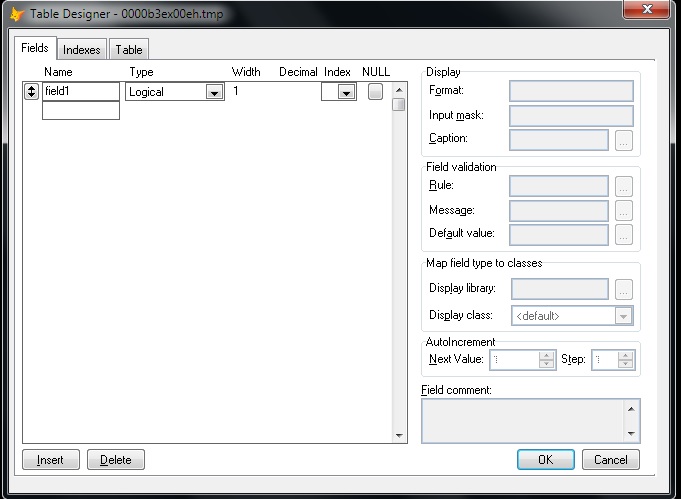
Anyway, Creating a logical field in a VFP cursor is as simple as this.

Create Cursor curTest (field1 l)

Select curTest
MODIFY STRUCTURE


But in MS SQL Server, with versions like 2008 or 2012, there is no Boolean or Logical field type. This is probably the reason why I see many software developers turning their trust to characters and integer types just to work around this inadequacy. 

For instance, a programmer can use several of the INT (integers) type field just to represent a value of 0 or 1. Because 0 and 1 can both respectively represent the ON and OFF nature of a basic switch. The idea makes sense until you add another value, like “2” then it loses the foremost characteristic of being a “flip-type” switch. 

The Workarounds in SQL Server


I’ve seen programmers use the int type, which has a range of -2^31 (-2,147,483,648) to  2^31-1 (2,147,483,647) and can take up storage of 4 Bytes in the table. Others use the smallint type, of which range is shorter than the int type but takes up 2 Bytes of storage space. There is also the tinyint that has a range of only 0 to 255 and takes up one Byte of storage space.

One thing to consider when you are feeling a bit determined to use these INT types for a simple switch is that each column of int created in a table will take up the storage space that I mentioned above. For example, if you have two columns of a tinyint field, each column will respectively take up one Byte of storage in a table.

At the other end of the spectrum, there are also those who use a character field to represent a switch in a similar fashion. These programmers, like I do in the early stages of my programming career, have liked the idea of using CHAR(1) type field to mimic the purpose of a logical field. The reason being is that it’s a straightforward solution and it’s easy to read. All that one needs to do is update the char field with a string having a value of “T” or an “F” character. 

The downside of using a char(1) field, however, is that it can take up other characters as well like “A” for instance, aside from the “T” or “F” characters. Also, each char(1) type column’s value in a table will take up 1 Byte of storage. Therefore, if you have two of this column in your table, the values will take up 2 Bytes and so on.

What I Think Is the Right Way to Do It


The best thing to do, in my humble opinion, is to use a bit type field in MS SQL Server. This type accepts integer data type like a bit value of 1 or 0, and it can have a NULL value as well.  

In this example, I’ve created a temporary table with a bit type field. I then inserted a 1 value.

If (Select name from sys.tables where name like '%#testTable%') is not null
      Begin
            drop table #testTable;

            create table #testTable (field1 bit);
     
            insert into #testTable (field1) values (1);
           
            select field1 from #testTable;     
      End

The advantage of the bit type is that it can automatically convert the string values TRUE and FALSE to bit values.  The “TRUE” becomes 1 and “FALSE” becomes 0.

If (Select name from sys.tables where name like '%#testTable%') is not null
      Begin
            drop table #testTable;

            create table #testTable (field1 bit);
     
            insert into #testTable (field1) values ('TRUE');
           
            select field1 from #testTable;     
      End

Sending Updates from Visual Foxpro


Luckily, MS SQL Server will convert the boolean value sent from Visual Foxpro by way of SQL-Pass Through or (SPT) connection.  

For this example, I have a table that I use for keeping LEAVE PAYS. It has a bit type column named isLeapYear. Let’s see what’s in it.


Notice that all other values in the isLeapYear column has zero values except for what’s in the fourth row, which has a bit value of 1.

Now, let’s try and change that into 0 (zero) by sending an UPDATE from Visual Foxpro with this command.

=SQLExec(oHandle.nHandle,'Update MyDatabase.dbo.MyTAble Set isLeapYear = .F.')


Now, we can see that all of the values in the isLeapYear column became zeros. 

Showing the Results with a Checkbox Control in a Grid


Let’s change the value of the fifth column, in the first row to 1. Then we’ll pull the records from MS SQL Server to a Visual Foxpro Grid that has a checkbox column.

=SQLExec(oHandle.nHandle,'Update MyDatabase.dbo.MyTAble Set isLeapYear = .F. where lpID = 9')


 So, this is how it should look like now. 


After we pulled the records from SQL Server, this is what a grid with a checkbox control would look like. Notice that the checkbox is automatically ticked because the underlying value in that column is .T. while the rest have .F. values. I will discuss how I created this checkbox in a grid  on a new post once I get a free time again.

Final Thoughts


Visual Foxpro is somehow lucky to have found its Logical values automatically converted by MS SQL Server to bit values. 

But another point worth considering for using a bit type field is that the SQL Server Database Engine optimizes storage of bit columns.  For example, if a table has less than 8 bit columns, all of the columns are stored as 1 byte. Having more than 8 bit columns but less than 16 will be stored as 2 bytes and so on.

As opposed to using an int type that always stores 1 byte or more per column, this is a great way to conserve server storage space if one is too concern about data normalization and storage conservation. 

Have a nice day!

Monday, 13 March 2017

CinchPro Payroll System


Right now, I'm working on a payroll system I named CinchPro Payroll System. This will be used as a separate payroll system or in conjunction with Tangosoft Biometric Attendance Software. The software fits Papua New Guinea's payroll procedures including tax deductions.

CinchPro comes from the word cinch, which means "easy" and pro as professional. The program aims to simplify payroll processing by removing much of the hassle and let the system work things out for you.

Friday, 21 October 2016

Connecting from C#.Net to SQL Server Like VFP's SQL Pass Through

Through The SQL By Glen Villar
If one wants to manipulate an SQL Server Database from C#.Net over a local area network in a similar manner that we do in Visual Foxpro through SQL Pass Through, it may not hurt to consider a simple technique that I use to achieve that.

Our friendly neighbourhood Samir Ibrahim from Lebanon has demonstrated to me a different approach using datasets via Ado.Net in a disconnected fashion which is interesting as well. But for this post, I will only demonstrate my approach first and I hope to discuss Samir’s approach in my future posts.

To make things easier and our server name changeable, we will write our connection string to a configuration file that comes along with a C# project.  The following is an example of a connection string added to a configuration file.  The filename is usually the project name plus a suffix.

For example, mine is MyProject.vshost.exe.config which is usually found in \YourProject\bin\Debug folder.

The Configuration File


<?xml version="1.0" encoding="utf-8" ?>

<configuration>
  <connectionStrings>
    <add name="MyConfigString" connectionString="server=MyServer;database=MyDatabase;user id=MyID;password=MyPassword;integrated security=false;connection timeout=30" />
  </connectionStrings>
</configuration>

The Database Connection Class


To make the connection handle available for calling in all forms, I suggest that we create a class that handles and stores that connection. We'll shall name the connection string MyConfigString.

using System.Data;
using System.Data.SqlClient;
using System.Configuration;
namespace MyProject
{
    class DatabaseClass
    {
        static string connectionString = System.Configuration.ConfigurationManager.ConnectionStrings["MyConfigString"].ConnectionString;
        public static SqlConnection myConnection = new SqlConnection(connectionString);   
       
        public DatabaseClass()
        {}
    }
}

Extracting Records and Displaying


In one of your forms, you may want to show records extracted from a table to a specific control, say, a ListView control for example. The following codes below show how it is done.We'll pass along a parameterized SQL query through the SQLCommand. 

Our connection handle in this example will be DatabaseClass.MyConnection. 

SqlParameter Par1 = new SqlParameter("@Param1", SqlDbType.Varchar, 20);
      Par1.Value = "000000121";

SqlDataReader DR = Null;
      String lcQueries = "";

lcQueries = @"Select t1.Field1, t1.Field1, t2.Field3,
From MyDatabase.dbo.MyTable T1
Where T1.Field1 = @Param1";

SqlCommand SqlCommand = new SqlCommand(lcQueries, DatabaseClass.myConnection);
      SqlCommand.Parameters.Add(Par1);

lvMyListView.Items.Clear();
      DR = SqlCommand.ExecuteReader();
      while (DR.Read())
{
ListViewItem List = new ListViewItem(DR["Field1"].ToString());
      list.SubItems.Add(DR["Field2"].ToString());
      list.SubItems.Add(DR["Field3"].ToString());
      lvMyListView.Items.AddRange(new ListViewItem[] { List });
      }
DR.Close();

Basically, what we did was to extract records from an SQL Server database using the command SQLCommand, reiterated through the extracted records and added each record to our list view control.


Hope this helps.

Friday, 15 April 2016

How To Enable Intellisense In SQL Server Management Studio 2008 R2


The intellisense is a feature in SQL Server Management Studio 2008 R2 (SSMS) that assists T-SQL developers to easily know the underlying tables or fields of a database when typing codes from within the query editor.  Functions and variables may also popup as soon as you begin typing one or the first two letters of the keyword.

Some may find it weird that even after having  SSMS configured to enable this feature, it just won't work. My best guess is that their SSMS isn't upgraded to SP3 yet. To upgrade the SSMS 2008 R2 to SP3, please visit this download link and choose the appropriate platform for you.

Once installed, restart your SSMS and check for the following settings. Go to TOOLS menu and select OPTIONS.

This section is under Transact-SQL. The checkbox for "Enable IntelliSense" should be ticked.

By this time, the intellisense should kick-in. If not, please check if "IntelliSense Enabled" is clicked  under the Query menu. The icon is sunken if it is enabled.


Lastly, try to refresh the IntelliSense local cache by pressing Ctrl+Shrft+R while in the query editor. I hope that you were able to get your IntelliSense working.

Until next time! 

Friday, 8 April 2016

How To Select All Nodes In Treeview In VFP 9.0


A more appropriate title of this article should have been  "How To Check All Child Nodes From a Parent Node In Treeview" but since I used a treeview control that contained only one parent node with multiple child nodes within, I guess I'd stick with the current title.

Here's one way I achieve the effect. But before I show the code behind, take note of the underlying table records where the treeview gets its record from.


The parent node has a "02_" string as a key as shown from the highlighted row in the image above. All the child nodes have different keys but have the same parent, a "02_" text that is used as a pointer to their parent node.

In the Treeview's .NodeCheck event, I wrote the following codes.

*** ActiveX Control Event ***
Lparameters Node
If Node.Key <> '02_'
      Return
Endif

For Each oNode In Thisform.oletreeView.Nodes
      oNode.Checked = Iif(Node.Checked,.F.,.T.)
Endfor

You can see that I added a checking routine to know if the user is ticking on the parent node or the child node. If the user has checked any of the child node, it will stop from there and will not proceed to executing the next codes, hence the "Return" keyword.

Next, I reiterate through all the treeview's nodes and set each node's checked property to either TRUE or FALSE depending on the parent's current "checked " status. If the parent's checkbox is unticked, the current child node in focus during which is set to checked; otherwise, it is unchecked.

Here's the result of which.


Monday, 8 June 2015

Is It Okay To Store Images In A SQL Server Database?

There are advantages and disadvantages to storing pictures/images into an SS Database versus storing the physical file in a folder.

In my personal experience, I can point out  a few points that saving them into the database can be better:
  • It protects the images from prying eyes or from malicious viruses that encrypt files.
  • If the machine where the SQL Server is hosted from has good specs, then there's a good chance that downloading and uploading pictures to the database is going to be fast. 
  • You are free to add more search parameters compared to doing searches in folders locally or over the network. You can add more tags to an image instead of relying only to its filename. For example, I can search for a picture using a unique code identifier (barcode) or do a wildcard search using its description.
Some disadvantages could be:
  • If you're storing large images in a table particularly high-resolution pictures with over 2MB in size, you may find that running a query on that table may slow down in time as you insert more pictures. The solution to this is to downsize the image before inserting them to a varbinary(max) field. Instead of inserting a 4MB picture, reducing the image's size down to let's say, 80KB before uploading it can help a lot. (I created my own Image/Picture Downsizing program using VFP and GDI+ to convert high-res picture to a descent low-res picture to help the company that I currently work with.)

Transfer and Downgrade is a module for Tangosoft I created to reduce the size of the images stored in our database.
  • Takes up space in the server. This is inevitable if you decide to store images into a SQL Server Database. But again, reducing the size of the image can help with saving space. I have stored tens of thousands of pictures in a SS database and the benefits that I gain have overshadowed those of the disadvantages.

Friday, 1 May 2015

Create A New Table From An Existing Table In MS SQL Server


If I want to transfer (copy) table and its record from one database to another, I would do this for example:

Select * Into [Database2].[Dbo].[Table1] From [Database1].[Dbo].[Table1]

Basically, that's how it can be done. You can alter the structure of the newly created table
by adding records from JOIN or via creation of new fields using CAST.

Thursday, 30 April 2015

Reindexing in VFP and MS SQL Server

In Visual Foxpro, there is no need to reindex an existing index once you create an index right after you open a table.

USE Temptable

INDEX on somefield TO someindex

In SQL Server, reindexing means building the index again. Rebuilding the index for a certain table in SQL Server is not cumbersome and how often you should do that would depend on your choice, if you wanted it done regularly or not at all.

You can either right click on an index (a node in indexes under a table) in SQL Server Management Studio and select REBUILD or run a query like my example below...

ALTER INDEX [pkid_index] ON [dbo].[Customers] REBUILD PARTITION = ALL WITH
   ( PAD_INDEX  = OFF, STATISTICS_NORECOMPUTE  = OFF, ALLOW_ROW_LOCKS  = ON,
   ALLOW_PAGE_LOCKS  = ON, IGNORE_DUP_KEY  = OFF, ONLINE = ON, SORT_IN_TEMPDB = OFF )


...or if you worry about your availability to execute a manual reindexing, you can assign the SQL Server Agent to do the thing automatically for you at a certain date and time. Mine for example is done every week at 00:00H when nobody is using my programs. You can create it in the Maintenance Plan.

Tuesday, 31 March 2015

Generating Unique ID's From An Auto-Increment Field

Here's an example of how we can create a reference to a 10-digit running number that we can use as a unique ID to anything we want.

We'll just need a table that contains nothing and will serve as a reference only to the last auto-generated number from its auto-increment field.

Here's the structure of the table in MSSQL to hold the 10-digit ID.

CREATE TABLE [dbo].[sometable](
 [lastuid] [int] IDENTITY(1000000000,1) NOT NULL,
 [dtstamp] [datetime] NULL
) ON [PRIMARY]


And here's the stored procedure to get the last ID from that table.

Create Procedure dbo.GetUID 
As 
Begin
 insert into sometable (dtstamp) values (getdate())
 select @@identity as lastUID
 delete from sometable
End

The procedure can be altered so that it retains a single row that contains the timestamp just in case we want to know when the last ID was generated. Just move the DELETE command to the line before the INSERT command. Either procedure will return the last generated ID.


Create Procedure dbo.GetUID 
As 
Begin
 delete from sometable
 insert into sometable (dtstamp) values (getdate())
 select @@identity as lastUID
End

And finally, we can extract a new unique ID in VFP by executing a call in an SPT connection.

=SQLExec(m.nConnection,'execute dbo.getuid','curTableID')


And from SSMS itself:

execute dbo.getuid will bring out:


Wednesday, 11 June 2014

Finding Matches Using LIKE With Square Bracket In MS SQL Server

In MS SQL Server, a common way to filter out a query or to get records with matching patterns is to pair a WHERE condition with the keyword LIKE.

Usually, it's much easier to pinpoint an exact match if you pair a WHERE condition with a constant value.

For example:

In a sample database provided by Microsoft, the AdventureWorks2008R2, I'll get the records from Person schema where a person's last name is Martinez. The query should be as simple as this:

use AdventureWorks2008R2
go

Select Top 2 t1.FirstName, T1.LastName from Person.Person As T1
where UPPER(T1.LastName) = 'MARTINEZ';
go

Monday, 9 June 2014

Exporting Visual Foxpro Tables to MS SQL Server

VISUAL FOXPRO 9.0 - I find out that the easiest way (for me) to upload VFP free tables into a SQL Server 2005 database is through the Upsizing Wizard provided by Microsoft Access 2010.

When Microsoft still supports VFPODBC, we can do that by setting up a data source pointing to VFP  tables and import them to a  MS Access Database.

But according to MS, they no longer support the VFPODBC and they recommend the use of Visual Foxpro OLE DB driver instead.

Too bad;  but anyway, we can still do something about this. I'll demonstrate a similar technique that does the same. Without VFPODBC, we will rely on Access' built-in dBASE importing option. The downside though is that it will only let us import one VFP table to MS Access Database at a time. If you're in for some boring software stuff, please read on. :)

Sunday, 8 June 2014

Create New Table From SELECT SQL

The Reporter's Assistant
Photo Credits: images.businessweek.com
In Visual Foxpro 9.0, it's a norm to do a SELECT statement that writes all the queried records to a new table. This saves you time from making a new table along with all the fields within and fill it with records later from a SELECT query.

A simple SELECT statement like the example below creates a new table in VFP from a query:

Saturday, 7 June 2014

SQL Server Identity Column vs VFP AutoInc Field

In  order to have an efficient table structure which minimizes data redundancy, developers have employed normalization in which tables are broken down into several tables connected together by a certain field which is either a primary key or a foreign key for the purpose of RDMS.

This is being done not only to avoid data redundancy but also to keep the size of the table small as possible especially if you are working with VFP free tables which have a maximum of 2GB filesize per table.

I have come to learn the use of the primary key (PK) and foreign key (FK) from www.foxite.com when I was younger and in VFP, we heavily make use of a special field called AUTOINC (auto-increment) field.

The AUTOINC field, as the word implies by itself, is just a field which automatically increments itself after a successful INSERT INTO command. The addition of this in VFP 9 has since freed the developers from the agony of maintaining a cumulative number which is used as a PK or for in any invoicing purposes.

Friday, 6 June 2014

Running an SQL Server's Stored Procedure from Excel Sheet


Figure 1.

There are times when your boss calls for an immediate solution for a simple problem but that can only be solved by your programming skill.

You look at the problem, analyze a solution within the scope of the software the company is currently using and work it out from there.

Thursday, 5 June 2014

Extracting Date from Datetime Expression or Datetime Field in SQL Server

Use Convert() Function. From MSDN, this is the syntax:

Syntax for CONVERT: CONVERT ( data_type [ ( length ) ] , expression [ , style ] )

To get it from a datetime expression,

Select Convert(varchar(10),GetDate(),111)

or from a field,

Select Convert(varchar(10),SomeField(),111)

So that when you perform a query with a criteria, you may write it like this:

Select convert(varchar(10),somefield(),111) between '2012/01/01' and '2012/01/10'

Wednesday, 4 June 2014

Scanning Individual Records In SQL Server and VFP


At work, it's been a common thing for me to execute my own queries in our SQL Server for reasons like fixing invalid entries or just for reporting purposes. Our POS and Data Management system are working fine, but the need for database administrator's intervention like myself is far from over. There are still data that needs to be pulled out from the database which the system cannot produce quickly.

Once, I was asked to update a few records from the database of which values in fields are in dire need of updates. The task was a bit tricky as each row must be evaluated individually. I originally planned to write a short program in VFP using an

Tuesday, 3 June 2014

How To Shrink SQL Server Database Transaction Log


I find this technique to be fairly simple enough but powerful. This must be run in SSMS.

backup log [dbname] with truncate_only;
go

DBCC SHRINKDATABASE ([dbname], 10, TRUNCATEONLY);
go

Don't bother doing this if you have no important reason to do so. I just needed to get a copy of our server's data into my  SQL Server Express which has a 4 Gig per database license restriction.

Have fun! :)

Monday, 2 June 2014

String Manipulation In SQL Server And Visual Foxpro SQL


One of my friend asked me about writing a query in SQL Server which can alter a portion of word or characters in a field in a table.

Since he is a VFP guy, I showed him how I could do this both in VFP and in SQL Server so he could understand it easily.

In Visual Foxpro, we can either write xbase-type codes or make use of VFP-SQL and use UPDATE in a query to change a portion of words in a field.

An example in VFP would be:

Related Posts Plugin for WordPress, Blogger...